Embeddable Widget
The TeleID Widget is in an early experimental phase and is available for evaluation purposes only. The API and configuration options may change without notice. If you would like to see a live demo and/or give feedback before it's finalized, reach out to support@idkollen.se.
The TeleID Widget is an embeddable web component that lets you add remote identification to any web application.
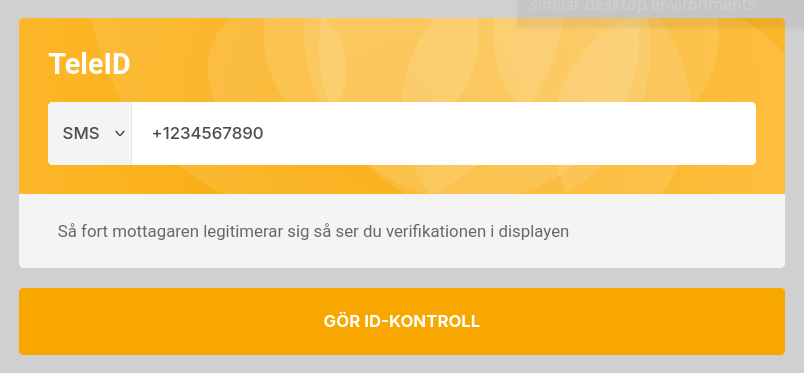
How it works
- The agent fills in the form and then clicks Identify.
- The recipient receives the request and completes the identification.
- The widget shows the verified result.
Installation
Include the widget script in your page's HTML. The widget is self-contained and has no external dependencies.
<script src="https://cdn.idkollen.se/widget/teleid/v1/teleid-widget.js"></script>
Add a container element where the widget should appear:
<div id="teleid-widget"></div>
JavaScript API
Select the widget element to access its API.
const widget = IDkollenTeleID.init({
  element: document.getElementById('teleid-widget'),
  baseUrl: '/idkollen',
  language: 'ENGLISH',
  // customFetch: window.fetch,
});
| Field | Description |
|---|---|
| element | The container element, or a selector, where to insert the widget. |
| baseUrl | The base URL for the API. Defaults to /idkollen. |
| language | The language for the widget: ENGLISH, SWEDISH, NORWEGIAN, DANISH, or FINNISH. |
| customFetch | Custom fetch implementation. |
widget.fillForm(fields)
Fill form fields programmatically, for example with data already available in your application:
widget.fillForm({
  method: 'PHONE',
  phone: '+1234567890',
});
| Field | Description |
|---|---|
| method | Pre-select the contact method: SSN, PHONE, EMAIL, or CHAT. |
| phone | Pre-fill the phone number field. |
| Pre-fill the email field. | |
| ssn | Pre-fill the SSN field. |
| provider | Pre-select the eID provider. |
widget.resetForm()
Clears the form and resets the widget to its initial state.
widget.start()
Submits the form programmatically, equivalent to clicking the Identify button. Returns a Promise that resolves once the session has been created.
widget.cancel()
Cancels the current session. Equivalent to clicking the Cancel button while the widget is waiting for the recipient.
Events
The widget fires DOM events on the container element:
widget.addEventListener('teleid:completed', (e) => {
  const { user } = e.detail;
  console.log(user.name, user.ssn);
});
| Event | Fired when | e.detail |
|---|---|---|
teleid:started | The session has been created and the link was sent. | { id } |
teleid:completed | The customer successfully identified themselves. | { id, user } |
teleid:failed | The session failed or was cancelled. | { id, error } |
teleid:cancelled | The agent cancelled the session from the widget. | { id } |
Backend endpoints
Since API keys must never be exposed to the browser, the widget communicates with your own backend, which proxies calls to the IDkollen API. You need to implement four endpoints.
Eventually you will be able to use the IDkollen SDKs to implement these endpoints.
Fetch services
The widget will call this endpoint to check for supported settings.
GET {base-url}/service
Accept: application/json
Your backend should call GET /v3/service on the IDkollen API and return the response with a 200 status code.
Start authentication
The widget calls this endpoint when the agent submits the form.
POST {base-url}/teleid
Content-Type: application/json
Accept: application/json
Your backend should call POST /v3/teleid on the IDkollen API and pass through the request body and return a 200 status code..
Fetch authentication status
The widget polls this endpoint to check progress.
GET {base-url}/teleid/{id}
Accept: application/json
Your backend should call GET /v3/teleid/{id} on the IDkollen API and return the response with a 200 status code.
Cancel authentication
The widget calls this endpoint when the agent cancels the authentication.
DELETE {base-url}/teleid/{id}
Your backend should call DELETE /v3/teleid/{id} on the IDkollen API and return a 204 response.
Support
For questions or to request access to the widget, contact support@idkollen.se.